

Findings
Code Traceback
Code Traceback connects a finding from a running application to the place in your code where the vulnerable endpoint is declared. A developer who gets the finding sees a file and a line, not only a URL.
How it works
Section titled “How it works”- Source intelligence reads your code and writes an OpenAPI document. Every operation in it carries an
x-sourcevalue: the file and line where the route is declared. - You scan the application with that document as its API spec.
- When a scan confirms a finding on an endpoint, NightVision matches the finding’s method and path to the operation in the spec, and reads the file and line from it.
paths: /search: post: x-source: src/main/java/hawk/controller/SearchController.java~~36The value is <file>~~<line>. See OpenAPI extract for how the document is generated.
In the dashboard
Section titled “In the dashboard”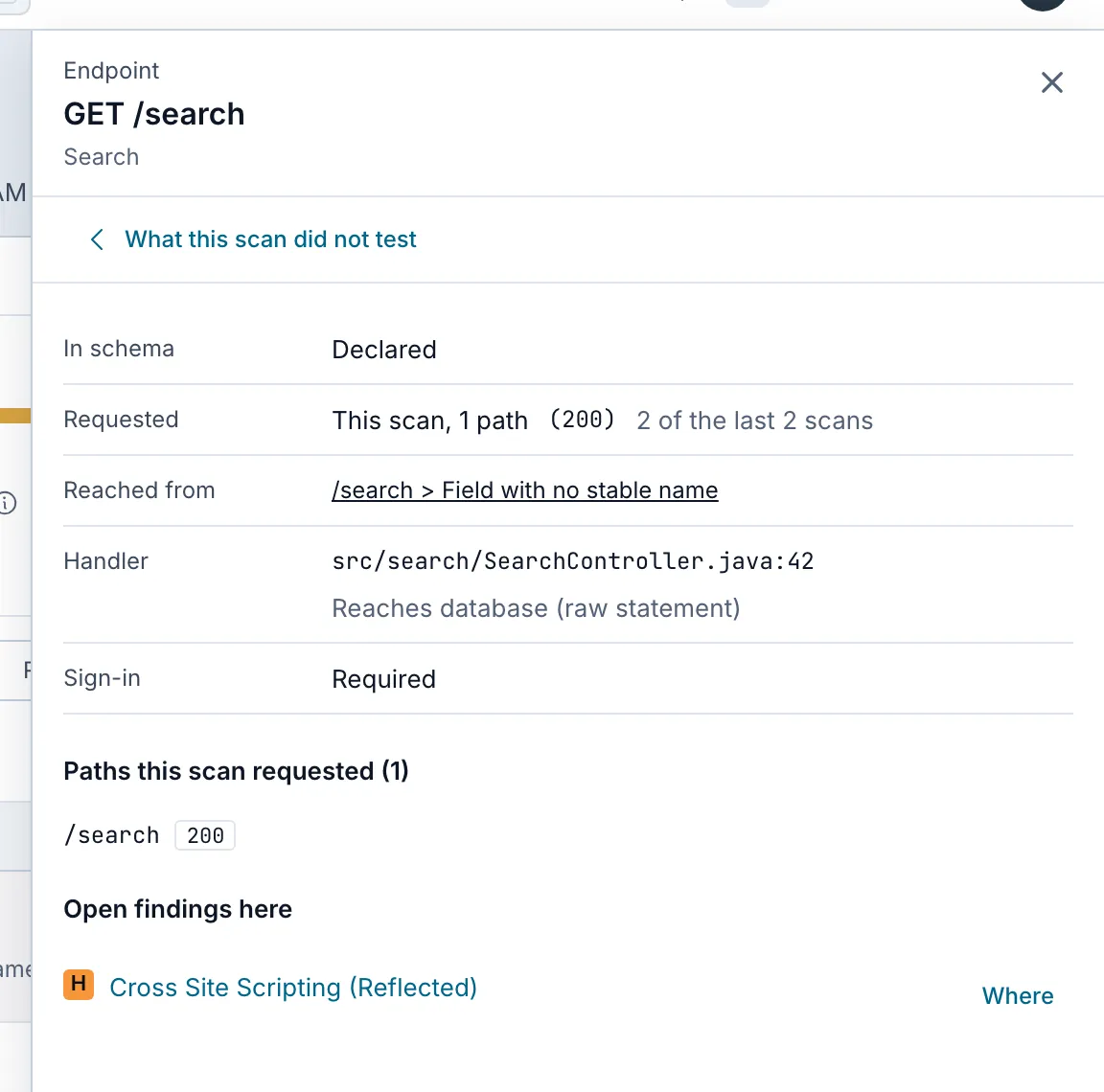
The file and line show wherever the dashboard lists endpoints:
- Coverage: open a scan and select the Coverage tab. The Handler column gives the file and line for each endpoint. Select an endpoint to open its side panel, which also lists the open findings on it. See Coverage.
- API inventory: open API inventory under Source intelligence and select an application. Filter by Source location, or open an endpoint and copy its file and line. See API inventory.
To go from a finding to its code, note the finding’s endpoint on the finding page, then open that endpoint on the scan’s Coverage tab.
In SARIF
Section titled “In SARIF”SARIF is the format that code scanning tools read. A NightVision SARIF export places each finding at the file and line of its endpoint, so the tool can show it inline in the code.
From the CLI, pass the same OpenAPI document that the scan used:
nightvision export sarif -s "$SCAN_ID" --openapi-file openapi-spec.yml -o results.sarif| Flag | What it does |
|---|---|
-s, --scan-id |
The scan to export. Required. |
--openapi-file |
The OpenAPI document used for the scan. With it, the SARIF output includes Code Traceback source locations. |
-o, --output |
Where to write the file. Default results.sarif. |
--exclude-resolution |
Leave out findings by status, for example wont_fix,false_positive. |
--exclude-severity |
Leave out findings by severity, for example info,low. |
nightvision export gitlab takes the same --openapi-file flag for a GitLab DAST report.
You can also download SARIF from a scan in the dashboard. See Reports and exports.
In GitHub code scanning
Section titled “In GitHub code scanning”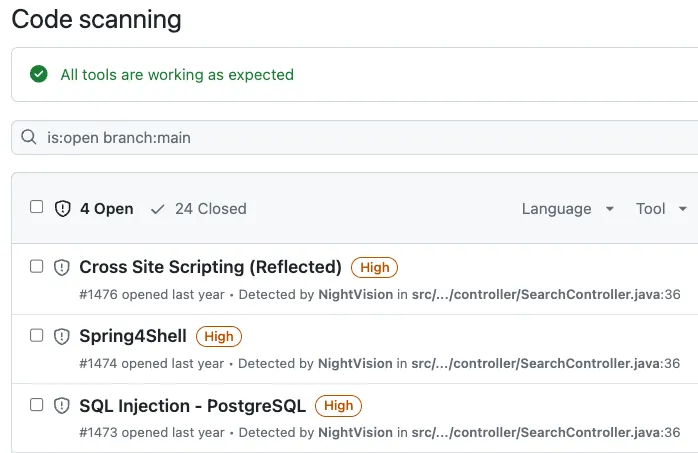
Upload the SARIF file to GitHub and each finding becomes a code scanning alert on the line that declares the endpoint.
Each alert tells the developer what was proven, not what might be wrong:
- The URL path and HTTP method that are vulnerable.
- The file and line where the application declares that endpoint.
- A description of the attack when the finding has a generated analysis: the payload NightVision sent, the parameter it went into, and what the application answered.
- A link back to the finding in NightVision.
Because every alert is a confirmed, reproducible finding, developers can act on it without a triage step in between.
To set this up in a pipeline, follow the GitHub Actions guide. It extracts the OpenAPI document, runs the scan, exports SARIF and uploads it on every push. The other pipeline integrations follow the same steps.
When there is no file and line
Section titled “When there is no file and line”| What you see | Why |
|---|---|
| No handler on any endpoint | The application has no API spec generated by source intelligence. |
| No handler on one endpoint | The scan reached a path that the spec does not declare, or the route comes from configuration and has no line in code. |
| SARIF results without locations | The export ran without --openapi-file, or the file is not the one generated from this code. |
See the framework support index for which frameworks source intelligence reads.