

Post-Quantum Readiness
When Source Intelligence extracts an OpenAPI document, it also assesses your code’s post-quantum readiness. It inventories the cryptographic choices your code makes and rates each one against NIST’s deadlines for moving to post-quantum cryptography. The inventory covers the choices a quantum computer will break, such as RSA keys, elliptic-curve key exchange and JWTs signed with RS256, and the choices that are weak already, such as an MD5 digest, an AES cipher in ECB mode, a JWT signed with none, a TLS 1.0 minimum, or certificate verification turned off. It also covers whom your code trusts: a committed CA bundle, or a pinned release of a root store package or runtime, that still trusts a certificate authority the browsers have distrusted. Each finding names the algorithm, where the code chooses it, why it is not ready, and what to use instead.
The analysis runs locally, in the same pass as nightvision openapi extract, and is on by default. Source code is not uploaded. NightVision receives only the findings, which name an algorithm, a key size or a curve and never contain key material. The findings for an API target appear on that target’s Quantum readiness tab in NightVision. They sit beside the cryptography that NightVision observes when it scans the running target, such as the TLS key exchange each host negotiates, described in What a scan adds.
Quick start
Section titled “Quick start”Extract a specification for an API target. The post-quantum readiness findings are uploaded to the same target:
nightvision openapi extract . --target my-apiTry the analysis without a target, keeping the results on your machine:
nightvision openapi extract . --no-target --no-uploadBoth commands write the report next to the OpenAPI document, as openapi-spec-weak-crypto.json with the default output name, and print a summary when the run finishes:
INFO Weak cryptography: 3 found (high=1, medium=1, low=1; 1 quantum-vulnerable).The analysis is on by default in CLI 0.23.0 and later. On CLI 0.22.5 through 0.22.x, add --weak-crypto to run it. Uploading findings to a target requires CLI 0.22.5 or later. The checks of trust stores, root store packages and runtimes, keystores, recoverable keys and revocation settings require CLI 0.25.1 or later. See Installing the CLI to upgrade.
What the analysis covers
Section titled “What the analysis covers”Cryptography in code
Section titled “Cryptography in code”Source Intelligence follows the values your code hands to cryptographic APIs, as it follows route paths and parameters. It reports the algorithm, mode, padding, key size, curve, iteration count, password-hashing cost, protocol version, cipher suite or verification setting that reaches a call that takes one. It also reports a weak value that an API uses by default when the code does not set one, and the default of an environment variable read, such as os.getenv("JWT_ALGORITHM", "RS256"), because the deployment may leave that variable unset.
In C# and JVM sources (Java, Kotlin, Scala and Groovy), a statement that turns off a certificate revocation check the platform would otherwise make is reported at low severity: X509RevocationMode.NoCheck assigned to a RevocationMode property, or PKIXParameters.setRevocationEnabled(false). A setting that only restates the platform’s default, such as CheckCertificateRevocationList = false, is not reported.
The language analyzers model the cryptography of each language’s standard libraries and popular packages:
| Language | Libraries and frameworks read |
|---|---|
| C# | .NET cryptography, TLS and HttpClient settings, ASP.NET Web.config and ASP.NET Core settings, ASP.NET Core key derivation, IdentityModel and JWT, OpenIddict, Duende IdentityServer, BouncyCastle, database connection strings, MailKit |
| Go | crypto/*, crypto/tls, crypto/x509, golang.org/x/crypto (including SSH), JWT libraries (golang-jwt, go-jose, jwx), and the JWT middleware of Chi, Echo and Fiber |
| Java | JCA and JSSE, HTTP clients (Apache HttpClient, OkHttp), Spring and Spring Security, Micronaut, and JWT libraries (Auth0 java-jwt, JJWT, Nimbus JOSE) |
| JavaScript and TypeScript | Node crypto, Web Crypto, tls and https, crypto-js, bcrypt, argon2, and JWT libraries and middleware (jsonwebtoken, jose, fast-jwt, passport-jwt, express-jwt, NestJS, Fastify, Hono) |
| PHP | hash, OpenSSL, sodium, password_hash, mcrypt, cURL and streams, Guzzle, phpseclib, mailers, JWT libraries (firebase/php-jwt, lcobucci/jwt, tymon/jwt-auth), Laravel and Symfony |
| Python | hashlib, hmac, ssl, cryptography, PyCryptodome, passlib, HTTP clients, JWT libraries (PyJWT, python-jose, jwcrypto), Django and Flask |
| Ruby | Digest, OpenSSL (including SSLContext), Net::HTTP and open-uri, HTTP clients (Faraday, HTTParty, RestClient, Excon, Typhoeus), RbNaCl and ed25519, bcrypt, JWT libraries (ruby-jwt, json-jwt, jose), Rails and its mailer settings, Devise, devise-jwt and Doorkeeper |
Cryptography in configuration
Section titled “Cryptography in configuration”Framework settings that select an algorithm are reported where the setting is written. This covers settings in code, such as Django’s PASSWORD_HASHERS or Flask-JWT-Extended’s JWT_ALGORITHM, and in the application configuration files a framework reads, such as Spring’s application*.yml and application*.properties or ASP.NET’s appsettings*.json and Web.config. A setting in a profile or environment variant, such as application-dev.yml, appsettings.Development.json or Rails’ config/environments/development.rb, is reported too, and the finding names the profile, since it may not be the choice production makes.
Committed files
Section titled “Committed files”Every project, whatever its language, is also checked for:
- Keys and certificates: the algorithm and size of committed private and public keys, SSH public keys, and certificates and certificate requests, including each kind of certificate in a CA bundle. A finding records the algorithm, size, curve and signature hash, and for a certificate its subject, issuer and expiry date. It never contains key material.
- Keystores: the certificates and private keys of PKCS #12 files and Java keystores (
*.p12,*.pfx,*.jks,*.keystore,*.truststoreandcacerts), assessed as PEM files are. A keystore is read when it opens with no password or with a default that tools write, such aschangeit. The finding says which of the two opened it and never the password. The trusted certificates of a Java keystore are read whatever its password. - Recoverable keys: every committed key is checked, from its public half alone, for a flaw that lets anyone compute the private key: an elliptic-curve key with a very small private scalar, an RSA modulus with a small prime factor or with primes close enough to factor, and the ROCA fingerprint (CVE-2017-15361). Such a key is broken, at high severity. Treat it as public: replace the key pair and revoke the certificates issued for it or under it.
- Distrusted CAs and stale trust stores: committed CA certificates are judged against the Mozilla root store and a catalog of CAs that root programs distrust. The certificate or key of a CA whose key is compromised is reported at high severity wherever it is committed. A committed CA bundle, such as a vendored
cacert.pem, is reported once as a stale trust store when it still trusts a root that Mozilla no longer trusts for TLS and that either has a compromised CA chaining to it (high) or was removed for cause (medium). The finding names those roots, the compromised CAs they admit, and the first file that loads the bundle. A bundle that only lags routine removals raises no finding, and a private CA is not judged. See Trust stores. - Root store packages and runtimes: the release of a package or runtime that supplies a client’s roots, judged by the roots that release ships. This covers certifi (an exact pin in a requirements file, or
poetry.lock,pdm.lock,uv.lockandPipfile.lock), composer/ca-bundle (composer.lock), webpki-roots (Cargo.lock), and Node.js (theFROM nodeline of a Dockerfile, or.nvmrcand.node-versionwhere no Dockerfile sets the release). A release whose roots admit a compromised CA is medium, and the finding names the first release that does not. One that holds a root removed for cause is low. A Node.js release line that has reached its end of life is noted at info severity, as is composer/ca-bundle unless the code asks for its bundled roots, because it otherwise uses them only where the system has none. - TLS configuration files: the protocol and cipher directives of nginx and Apache configuration files, the obsolete
Expect-CTheader they send, and the minimum protocol and cipher string of OpenSSL configuration files. - Cryptography libraries: a direct dependency on a cryptography library outside NightVision’s approved set, such as CryptoJS, PyCrypto or mcrypt, read from the manifests that ship:
requirements*.txt,pyproject.toml,Pipfile,package.json,composer.json,Gemfile,go.mod,pom.xml,build.gradleand .NET project files. Development and test dependencies are not read. - Hand-written algorithms: an implementation of a standard algorithm, such as MD5, SHA-1, SHA-256, AES, DES or ChaCha20, recognized by its constants in any common source file. A validated library is the safer choice.
Trust stores
Section titled “Trust stores”A client outside the browsers trusts the CAs its trust store holds, and many applications commit that store or pin the package that carries it. Such a store keeps trusting a CA long after the browsers stop, since few of these clients check revocation. A client whose store still trusts a root behind a compromised CA accepts whatever certificate the holder of that CA’s key signs.
The analysis judges every committed file whose certificates are all CA certificates as a trust store, against the Mozilla root store’s TLS trust, which most vendored bundles copy. The catalog it uses is generated from the CCADB reports of the roots Mozilla includes and has removed, Mozilla’s OneCRL, and a curated list of compromises and removals for cause, among them DigiNotar, Symantec, WoSign and StartCom, TrustCor, and the eMudhra intermediate CAs whose keys were found recoverable in 2026. The catalog ships with the CLI, so the analysis runs offline and gives the same answer on every run. The report’s trustCatalog.date says when its sources were read.
The report’s trust summary lists every committed trust store, with or without a finding, so you can see where your clients take their trust from:
| Status | Meaning |
|---|---|
current | Every root the catalog knows is one Mozilla trusts for TLS. |
lagging | The store holds roots Mozilla no longer trusts, none of them behind a compromise or removed for cause. No finding is raised. |
stale | The store holds a root that a compromised CA chains to, or one removed for cause. This is the stale trust store finding. |
private | The store holds no root the catalog knows, as for a private CA. Pointing a client at a private CA is good practice. |
For a store of public roots, the summary also lists its loaders: the source and configuration files that name the bundle by its path or file name, such as ca_file: config/cacert.pem. A stale trust store that no file names is reported for review, with heuristic confidence in the report, since nothing shows that a client loads it. To clear a stale trust store finding, refresh the bundle from a current CA extract or use the system store. For a package or runtime, upgrade to the fixed release the finding names, or later.
What is not reported
Section titled “What is not reported”- Values the code does not show. A choice read from the environment with no default, from a file, from a secrets manager, or supplied by
nv.configis not reported, because the source does not establish it. - Code Source Intelligence does not reach. A call is read only where the analysis walks: from a route, an entry point, or the module it is written in. A call in a function nothing reaches, such as a background job or a management command, may be missed.
- Branches are not told apart. A setting made under a condition counts as made, so
if strict: ctx.check_hostname = Truecounts as turning the host name check on. - Cryptography libraries that another dependency pulls in. Cryptography libraries are judged from a manifest’s direct dependencies only. Lock files are read only for the root store packages above, which are almost always another package’s dependency.
- Keystores that need a project password. A PKCS #12 file that neither no password nor a default one opens is not read, nor are the private keys of such a Java keystore. JCEKS and BKS stores are not read.
- Other root stores. Root store packages and runtimes beyond those listed above, such as the Go toolchain’s own roots, are not judged. A version range, such as
certifi>=2019.11.28, is not resolved, and neither is a Node.js image named by a Compose file, a CI configuration or a build argument. - CAs distrusted since the catalog was built. The catalog of distrusted CAs ships with the CLI, so the analysis is as current as the CLI that runs it. Upgrade the CLI to pick up a newer catalog.
A finding on a line that a developer marked for another tool, such as nosemgrep, nosec, NOSONAR or lgtm, is still reported, and the report records the marker, so you can see what was accepted elsewhere.
How findings are rated
Section titled “How findings are rated”Weaknesses
Section titled “Weaknesses”Each finding carries one or more issues. Each issue names a weakness, the reason, the remediation and the standard that classifies it, such as NIST SP 800-131A or NIST IR 8547:
| Weakness | Meaning | Examples |
|---|---|---|
| Broken | Practical attacks are known. | MD5 and SHA-1 digests and signatures, DES, RC4, SSL 3.0, JWT none, plaintext or reversible password storage, RSA below 1024 bits, a committed key whose public half gives the private key away |
| Misuse | A sound primitive used unsoundly. | ECB mode, an IV written in the source, RSA PKCS #1 v1.5 encryption, too few PBKDF2 iterations, a low bcrypt, scrypt or Argon2 cost, certificate or host name verification turned off, certificate revocation checking turned off |
| Deprecated | Below current minimums. | 3DES, Blowfish, TLS 1.0 and 1.1, RSA and DH below 2048 bits, DSA, HMAC-MD5, the obsolete Expect-CT header |
| Distrusted CA | The certificate or key of a CA whose key is compromised, which root programs distrust. | DigiNotar Root CA, a compromised intermediate CA’s certificate in a committed bundle |
| Stale trust store | A CA bundle, or the roots of a package or runtime release, that still trusts a root Mozilla no longer trusts for TLS: one a compromised CA chains to, or one removed for cause. | A 2021 cacert.pem, certifi==2019.11.28, a FROM node:18 image |
| Quantum-vulnerable | Public-key cryptography that a large quantum computer can break. | RSA, ECDSA, EdDSA, ECDH, X25519, classical TLS key exchange groups, JWT RS256, ES256 and EdDSA |
| Unvalidated implementation | A standard algorithm written in the application rather than taken from a validated library. | A hand-written MD5 or AES |
| Unapproved library | A cryptography library outside the approved set. It inventories a choice to review rather than a fault. | CryptoJS, PyCrypto, mcrypt |
A choice is judged by the role it plays where it is used. SHA-1 is broken as a digest or a signature hash, deprecated as an HMAC hash, and raises nothing as the hash of RSA-OAEP. A digest is rated high only when the data it hashes looks secret, such as a password or a token. Post-quantum choices, such as ML-KEM and ML-DSA, and TLS groups that establish the key with ML-KEM, such as X25519MLKEM768, raise no issue. They appear in the inventory at severity none, so you can see what has already been migrated.
Severity
Section titled “Severity”A finding’s severity is that of its worst issue: High, Medium, Low or Info. Quantum-vulnerable encryption and key establishment are medium, because traffic recorded today can be decrypted once a quantum computer exists (“harvest now, decrypt later”). The same goes for the keys that sign tokens, which take long to replace. Other quantum-vulnerable keys, certificates and signatures are low, since a signature cannot be forged before such a computer exists.
Readiness status
Section titled “Readiness status”NightVision also gives each finding a readiness status, based on its issues and the deadlines that NIST has set for them:
| Status | Meaning | Example |
|---|---|---|
| Fix now | The choice is broken or misused, or its NIST deadline has passed. | MD5 password hashing, certificate verification turned off |
| Migrate by 2030 | NIST deprecates or disallows the choice in 2030 or earlier. | RSA-2048, 3DES |
| Plan by 2035 | The choice is quantum-vulnerable and NIST disallows it after 2035. | ECDSA with P-256, X25519 |
| Ready | The choice raises no issue today. Most Ready findings are ordinary choices with no deadline, not post-quantum ones. | TLS 1.3, an AES-GCM cipher suite, or a post-quantum choice such as ML-KEM-768 and the X25519MLKEM768 TLS group |
| Unknown | The choice is not one NightVision knows how to assess. That is no evidence that it is sound. | An unrecognized algorithm name |
A distrusted CA and a stale trust store have no NIST deadline: they are Fix now. A finding whose only issues are informational, such as a Node.js release line past its end of life with current roots, is Ready at Info severity.
The status is computed again whenever a new report includes the finding, so a deadline that passes moves the finding to Fix now. A finding is also assessed again in place, keeping its history, when a newer CLI brings a newer catalog of distrusted CAs.
Running the analysis with the CLI
Section titled “Running the analysis with the CLI”nightvision openapi extract runs the analysis together with the specification extraction (nightvision swagger extract is the same command). All the options in the CLI Reference apply. The CLI’s flags, report file and log lines call the analysis weak cryptography.
| Flag | Purpose |
|---|---|
--weak-crypto | Run the post-quantum readiness analysis. On by default in CLI 0.23.0 and later; on CLI 0.22.5 through 0.22.x, pass it to run the analysis. |
--no-weak-crypto | Skip the analysis. No report is written or uploaded, and the target’s existing findings are left as they are. |
--output, -o | The report is named after the OpenAPI output: --output api.yml writes api-weak-crypto.json. |
--no-upload | Write the report locally without uploading it. |
--no-target | Run without a target. The report is written locally but not added to any target. |
Files and terminal output
Section titled “Files and terminal output”The report is always JSON and is written beside the OpenAPI document as <output name>-weak-crypto.json. The CLI writes it on every run that produces analysis results, even when the specification itself is not written or uploaded. The OpenAPI document is identical with the analysis on or off.
When the run finishes, the CLI logs a one-line count by severity, leaving out severities with no findings, or Weak cryptography: none found. The summary at the end of the run gets a Weak cryptography row that lists the most severe findings, up to eight, with their locations:
INFO Weak cryptography: 3 found (high=1, medium=1, low=1; 1 quantum-vulnerable).Uploading findings to a target
Section titled “Uploading findings to a target”When a run names an API target with --target or --target-id, the CLI uploads the report to that target after a successful run and logs how many findings are new, updated and resolved:
INFO The weak cryptography report was uploaded to the target. new=2 updated=1 resolved=1The report is not uploaded with --no-upload or --no-target, or when the run fails. A failed report upload is logged as an error but does not change the CLI’s exit status, so it never fails a pipeline on its own.
Because the analysis runs by default, every nightvision openapi extract run that names a target keeps that target’s findings current, including runs in CI/CD pipelines and through the NightVision MCP server. No extra configuration is needed.
Keep the scope the same for every run
Section titled “Keep the scope the same for every run”NightVision matches findings across runs by a fingerprint that includes the file path relative to the analysis root. When a later report is complete, NightVision resolves every open finding of the target that the report no longer contains. For that to work, every upload to a target must come from a run with the same scope: the same source paths, --root-path, --lang, --exclude, --no-default-excludes, --import-root and --import-package.
- A narrower run resolves findings in code it did not analyze.
- A run from a different root resolves every finding and then reports them all again as new.
Set --root-path to the repository’s top level, and run the same command each time, for example from your CI/CD pipeline.
Incomplete reports
Section titled “Incomplete reports”If part of the analysis could not complete, the CLI warns that the report is incomplete, so a choice missing from it may only be unread, and names the reason:
| Reason | Meaning |
|---|---|
file-scan-limit | The committed-file scan stopped at its limit of directory entries, so the rest of the tree was not checked for keys, certificates and libraries. |
keystore-limit | Keystores the scan recognized were left unread, because decoding one took too long or the store exceeded a size bound. The warning’s detail and the report’s gap name them; the rest of the report is unaffected. |
contained | A language analyzer recovered from an internal failure and continued. The diagnostics file beside the result records where. |
interrupted | The run was stopped before it finished. |
An incomplete report still adds and updates the findings it contains, but it does not resolve findings that are missing from it.
What a scan adds
Section titled “What a scan adds”When quantum readiness is on for your organization, every scan of the target, web or API, also records the cryptography its https hosts serve. A login check does not, and a scan that stops at its online or login verification records nothing. These checks only connect and read. They attack nothing, run alongside the scan without delaying it or failing it, and reach a private target through the same relay as the scan.
- TLS handshake check. For each in-scope
httpshost (the target URL, the base URLs of its API schemas and its additional paths; hosts the crawl finds are not checked), NightVision runs a few handshakes: one like a current browser, one offering only the hybrid post-quantum groupX25519MLKEM768, one with classical groups only, one capped at TLS 1.2, and a probe for servers no modern client can complete a handshake with. It reports the key exchange, the TLS version, the cipher suite and each certificate in the chain. - Token signing check. At the end of the crawl, NightVision reads the headers of the JWTs it finds in the in-scope traffic, sampling a few messages per endpoint, and records their signing algorithms, one finding per host and algorithm. The token, its claims and its signature are never stored.
- Identity provider check. For each in-scope host, NightVision reads the OpenID Connect discovery document, the OAuth authorization server metadata and the JWKS at their well-known paths, and records the ID token signing algorithms the provider allows and the key types and sizes it publishes. It reads a JWKS only from an in-scope
httpshost, so the keys of a hosted identity provider on another domain are not checked.
The Hosts table shows the TLS handshake check’s result per host:
| Readiness | Meaning |
|---|---|
| PQC-ready | A current browser negotiates a hybrid post-quantum key exchange with the host. |
| Classical only | The host speaks TLS 1.3 but negotiates a classical key exchange, such as X25519. Hybrid supported says whether it accepts X25519MLKEM768 when a client offers nothing else. |
| Legacy TLS | The host does not speak TLS 1.3, so no hybrid key exchange is possible. |
Scan findings resolve on their own. When a later scan runs a check and no longer sees a choice it reported before, that finding is resolved, including on a host that is no longer in scope. A host the scan could not reach keeps its findings until a scan reaches it. A token signing finding from traffic is resolved after three scans that saw tokens but not that algorithm, because a crawl only sees the tokens it happens to meet.
Working with findings in NightVision
Section titled “Working with findings in NightVision”Finding the Quantum readiness tab
Section titled “Finding the Quantum readiness tab”Open Targets, select the target, and choose the Quantum readiness tab. You can also reach it from Projects, then the project’s Targets tab, then the target. The tab is available for every target type except GitHub targets, and it is turned on for organizations by default. If your organization does not show the tab, contact NightVision support.
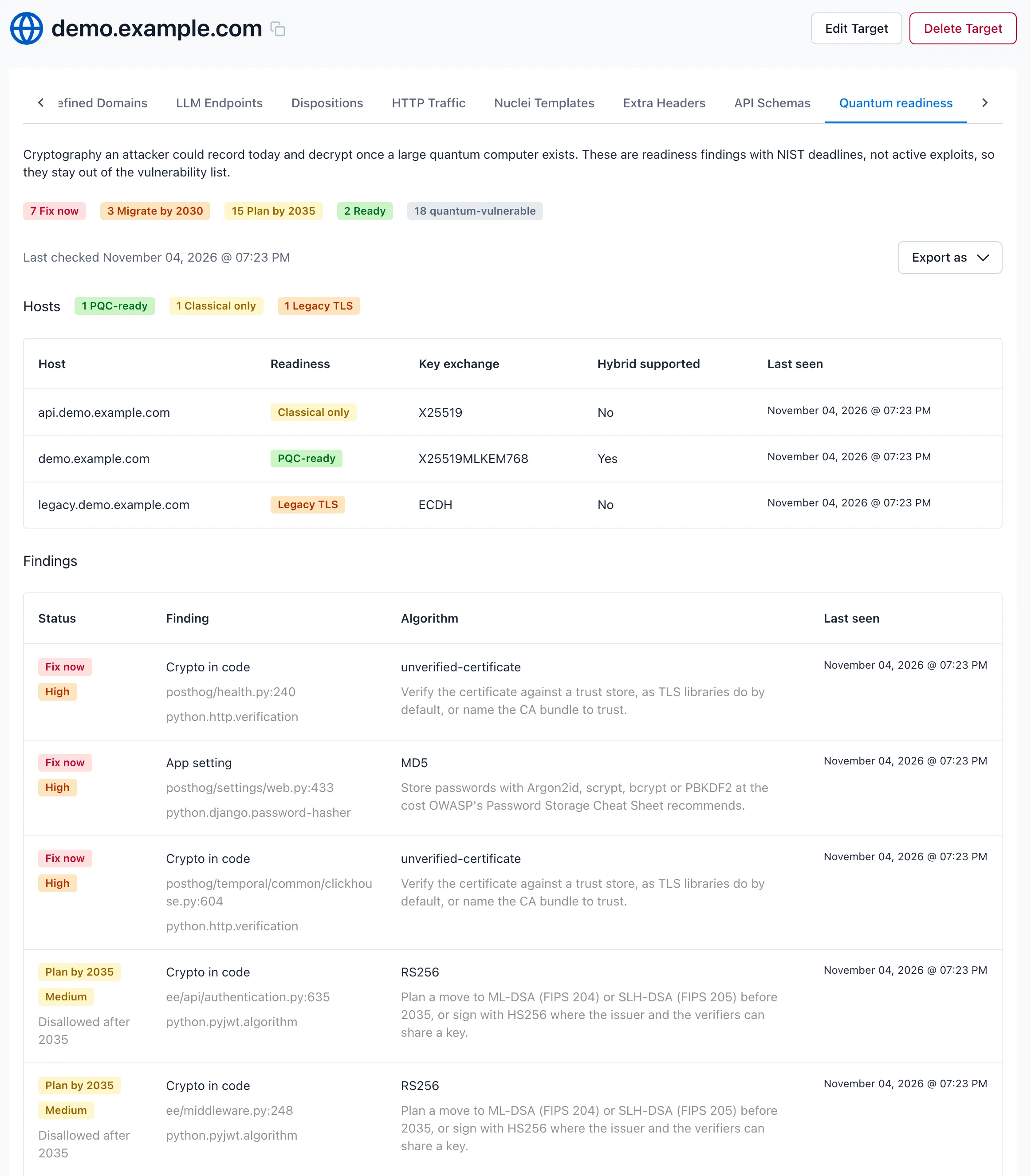
Until a report or scan has produced results, the tab shows “No quantum readiness results yet. They appear after the next scan of this target.” For an API target, it also suggests running the CLI with the analysis.
Summary
Section titled “Summary”The top of the tab counts the target’s open findings by readiness status (Fix now, Migrate by 2030, Plan by 2035, Ready, and Unknown when there are any), and how many are quantum-vulnerable. Last checked shows when NightVision last received results for the target.
Hosts lists what NightVision observed when it scanned the running target: each host’s TLS key exchange, whether it supports a hybrid post-quantum group, and a readiness badge (PQC-ready, Classical only or Legacy TLS), explained in What a scan adds. Source Intelligence does not fill this table. A target that has only source findings shows “No hosts checked yet. They appear after the next scan of this target.”
Findings
Section titled “Findings”The Findings table lists the open findings from source code and from scans together, ordered by severity. A Plan by 2035 finding at medium severity is listed above a Migrate by 2030 finding at low severity:
| Column | Shows |
|---|---|
| Status | The readiness status, the severity, and the NIST deprecation and disallowance years where they apply. |
| Finding | What kind of asset it is (Crypto in code, App setting, Committed file, Crypto library, Trust store for a committed CA bundle, Root store package or Runtime roots for Source Intelligence findings), its location as file:line, and the rule that found it, such as python.pyjwt.algorithm, which names the library and parameter. Findings from scans are labelled TLS key exchange, TLS version, Cipher suite, Certificate, Token signing, ID token signing or Token signing key, and show the host instead of a file. |
| Algorithm | The algorithm with its key size or curve, such as RSA-1024, and the recommended replacement. A trust store shows its count of untrusted roots instead. A root store package or runtime shows the release found, such as certifi 2019.11.28 or Node.js 18 (18.20.8), and the first fixed release where there is one. |
| Last seen | When a report or scan last contained the finding. |
These findings are readiness findings with deadlines rather than exploitable vulnerabilities, so they stay out of the target’s vulnerability list.
Resolving findings
Section titled “Resolving findings”Fix the code, then run nightvision openapi extract for the target again with the same scope. When a complete report no longer contains a finding, NightVision resolves it and the tab stops listing it. A finding the report still contains has its Last seen time updated.
Findings from scans need no action here. They are resolved by the next scan that reaches the host and no longer sees the choice, as described in What a scan adds.
Exporting an inventory
Section titled “Exporting an inventory”Use Export as to download the target’s open findings:
- CSV: a cryptographic inventory spreadsheet, one finding per row.
- CBOM (CycloneDX): a Cryptography Bill of Materials in the CycloneDX 1.7 format, for tools that consume CBOMs and for compliance records. Verification settings and trust stores name no cryptographic asset, so they are in the CSV but not in the CBOM.
Report file reference
Section titled “Report file reference”The local report is useful in automation, for example to fail a pipeline on high-severity findings. It looks like this:
{ "format": "nightvision.weak-cryptography", "version": 4, "producer": "api-excavator", "catalogVersion": 5, "trustCatalog": { "date": "2026-10-22", "sources": [ "https://ccadb.my.salesforce-sites.com/mozilla/IncludedCACertificateReportCSVFormat", "https://ccadb.my.salesforce-sites.com/mozilla/RemovedCACertificateReportCSVFormat", "https://firefox.settings.services.mozilla.com/v1/buckets/security-state/collections/onecrl/records" ] }, "trust": { "stores": [] }, "complete": true, "summary": { "findings": 1, "severities": { "medium": 1 }, "weaknesses": { "misuse": 1 } }, "findings": [ { "id": "9a38c22a47902bf2", "fingerprint": "7909b03317fef04c", "rule": "python.pycryptodome.mode", "source": "code", "language": "Python", "location": { "file": "app.py", "line": 29, "column": 13 }, "scope": "seal", "primitive": "cipher-mode", "algorithm": "ECB", "attributes": { "cipher": "AES" }, "severity": "medium", "confidence": "high", "issues": [ { "weakness": "misuse", "severity": "medium", "reason": "ECB encrypts equal blocks to equal ciphertext, so it leaks the plaintext's structure; NIST SP 800-131A Rev. 3 disallows it for encryption.", "remediation": "Use an authenticated mode such as AES-GCM.", "reference": "https://csrc.nist.gov/pubs/sp/800/131/a/r3/ipd" } ] } ]}| Field | Meaning |
|---|---|
version, catalogVersion | The version of the report layout and of the classification that rated the findings. CLI 0.25.1 writes layout version 4, which adds trustCatalog, trust and the keystore-limit gap, and catalog version 5, which adds the trust store, distrusted CA, recoverable key and revocation checks. |
trustCatalog | The date of the catalog of distrusted CAs that certificates and trust stores were judged against, and the sources it was generated from. |
trust | The trust summary: each committed trust store with its file, its status (current, lagging, stale or private), counts of its trusted and untrusted roots, and the loaders that name it. See Trust stores. |
complete, gaps | Whether the report covers everything the run analyzed; when it does not, gaps lists the reasons. |
summary | Findings counted by severity and by weakness. |
rule | What found it: <language>.<library>.<parameter> for code and configuration, or file.<kind> for a committed file. |
source | code, config (a framework setting) or file (a committed file). |
location, scope | Where the choice is written, and the function or class around it. |
sinks | Where the analysis saw the choice used, when that is elsewhere. |
primitive, algorithm, parameters | The role the choice plays (hash, cipher-mode, signature, protocol, trust-store, …), what was chosen, and details such as keySize, curve or iterations. For a recoverable key, flaw names what gives the private key away. For a distrusted CA or a stale trust store, distrust is compromise or for-cause. |
attributes | Context, such as the setting a value is held under, default when the value is an API’s default, profile for a configuration profile, or suppressed for a marker another tool reads. A committed certificate has its subject, issuer and notAfter. A keystore entry has its type and how the store opened (password: none or default). A stale trust store has the roots that make it stale, the compromised CAs it admits and the event behind them (distrust, distrustReference). A root store package or runtime also has its ecosystem, the version written, the release it resolved to and the fixed release. |
confidence | high when a rule decides the finding, or heuristic when it is for review: a stale trust store that no file names, a Node.js release that only a version file names, and a revocation check turned off. |
severity, issues | The worst issue’s severity, and each issue’s weakness, reason, remediation and reference, with NIST’s deprecatedAfter and disallowedAfter years where scheduled. |
fallbackFor | The environment variables whose default the value is. |
id, fingerprint | Identifiers. The fingerprint leaves out the line, so it survives edits elsewhere in the file. It also leaves out the judgements a catalog can change (flaw, distrust, fallback, endOfLife), so a finding keeps its identity when a newer catalog rates it differently. |
Troubleshooting
Section titled “Troubleshooting”The run printed no Weak cryptography summary. Check the CLI version with nightvision version. The analysis is on by default from CLI 0.23.0; on 0.22.5 through 0.22.x, pass --weak-crypto.
The CLI skipped the analysis or did not upload the report because quantum readiness is turned off. The target’s organization has quantum readiness turned off. Pass --weak-crypto to run the analysis locally anyway, or --no-weak-crypto to skip it. Contact NightVision support to turn quantum readiness on.
Findings were resolved and reported again as new. The runs used different source paths or a different --root-path. Keep the scope the same for every upload to a target, as described in Keep the scope the same for every run.
A weak choice in my code is not reported. The value may come from somewhere the code does not show, or the code may not be reached from a route or entry point. See What is not reported.
A stale trust store or distrusted CA is not reported. These checks need CLI 0.25.1 or later, and they judge against the catalog that ships with the CLI, so a CA distrusted more recently needs a newer CLI. A bundle that only lags routine removals, a private CA, and a keystore that needs a project password raise no finding. See Trust stores and What is not reported.