

JIRA
NightVision files Jira tickets directly with the nightvision export jira CLI
command, and syncs Jira status changes back to findings from the NightVision app.
See Jira for that built-in integration. The script below is an
alternative for teams that already produce a SARIF file and prefer to run their
own ticket-filing step.
Description
Section titled “Description”This repository contains scripts and configurations to interact with Jira and manage project vulnerabilities using NightVision SARIF reports.
Preview: Example Results
Section titled “Preview: Example Results”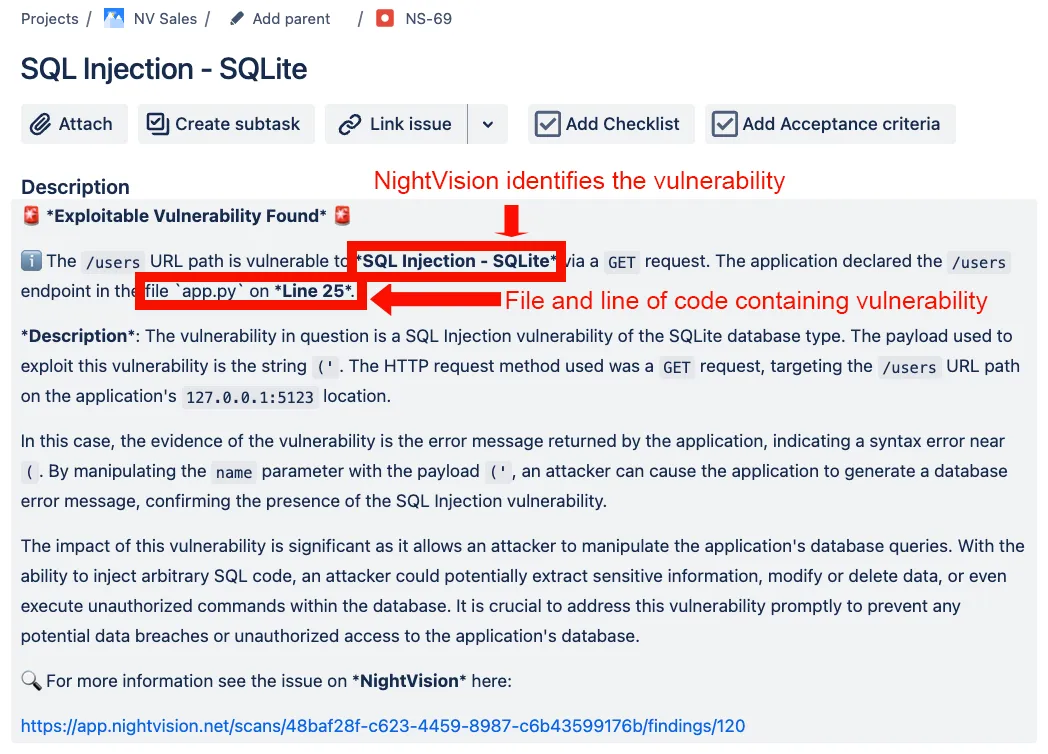
Prerequisites
Section titled “Prerequisites”- Python 3.x
- Jira account and API token
- NightVision account
-
Clone the repository:
Terminal window git clone https://github.com/nvsecurity/jira-issue-from-sarif.gitcd jira-issue-from-sarif -
Install required packages:
Terminal window pip install jira -
Set environment variables (or pass these arguments directly to the scripts):
Terminal window export JIRA_URL='your_jira_url'export JIRA_USER_EMAIL='your_jira_user_email@example.com'export JIRA_API_TOKEN='your_jira_api_token' # see Create Jira API Token belowexport JIRA_PROJECT_ID='your_jira_project_id' # see Find Jira Project ID belowexport JIRA_ISSUE_TYPE='your_jira_issue_type' # optional, defaults to 'Task'export JIRA_COMPONENT='your_jira_component' # optional
Create Jira API Token
Section titled “Create Jira API Token”- Go to Jira API tokens.
- Create a new API token and copy it.
Find Jira Project ID
Section titled “Find Jira Project ID”-
Run the following command to get Jira project IDs:
Terminal window python get-jira-project-id.pyUsage:
usage: python get-jira-project-id.py [-h] --url URL --email EMAIL --token TOKENCreate Jira tickets from SARIF report.optional arguments:-h, --help show this help message and exitJira server credentials:--url URL Jira server URL (JIRA_URL environment variable)--email EMAIL Jira user email (JIRA_USER_EMAIL environment variable)--token TOKEN Jira API token (JIRA_API_TOKEN environment variable) -
Select the Jira Project ID you need. Example output:
Projects Available: 21Project ID: 10001Name : NightVisionKey : NV2Project ID: 10004Name : NV SalesKey : NS
Create Tickets from SARIF
Section titled “Create Tickets from SARIF”-
Export NightVision SARIF report for a specific scan:
Terminal window nightvision export sarif -s "your_scan_id" --swagger-file "./your/swagger/file/path.yaml"This should create a
results.sariffile in your current directory. -
Create Jira tickets from the SARIF report:
Terminal window python sarif-to-jira.py -p "your_project_id"Usage:
usage: python sarif-to-jira.py [-h] --url URL --email EMAIL --token TOKEN -p PROJECT-ID -i TYPE -c COMPONENT[--sarif-file SARIF_FILE] [--dry-run] [--max-issues N]Create Jira tickets from a NightVision SARIF report (deduped, severity-mapped).optional arguments:-h, --help show this help message and exitJira server credentials:--url URL Jira server URL (JIRA_URL environment variable)--email EMAIL Jira user email (JIRA_USER_EMAIL environment variable)--token TOKEN Jira API token (JIRA_API_TOKEN environment variable)Issue properties:-p PROJECT-ID, --project-id PROJECT-IDJira Project ID (JIRA_PROJECT_ID environment variable)-i TYPE, --issue-type TYPEIssue type - defaults to 'Task' (JIRA_ISSUE_TYPE environment variable)-c COMPONENT, --component COMPONENTIssue component (JIRA_COMPONENT environment variable)Run options:--sarif-file SARIF_FILEPath to the SARIF report - defaults to 'results.sarif'--dry-run Report what would be created without creating any Jira issues--max-issues N Stop after N issues are created
De-duplication, re-runs, and severity
Section titled “De-duplication, re-runs, and severity”Every ticket the script creates carries two Jira labels: a constant nightvision
label and a per-finding nv-fingerprint:<key> label. Before creating a ticket, the
script searches the project for that nv-fingerprint:<key> label and skips the
finding if a ticket already exists:
-
Running the script repeatedly against the same scan creates each ticket once; re-runs only fill gaps. Tickets are never updated or closed by this script.
-
Finding severity is mapped to a Jira priority (CRITICAL to Highest, HIGH to High, MEDIUM to Medium, LOW to Low, INFO to Lowest). The priority is applied only if your Jira priority scheme defines that name; otherwise it is omitted.
-
Use
--dry-runto preview what would be created versus skipped, and--max-issues Nto cap large reports.--dry-runstill connects to Jira for the dedup search, so it requires valid credentials.