

Jenkins
View our Video Guide for a more in-depth demo.
Preview
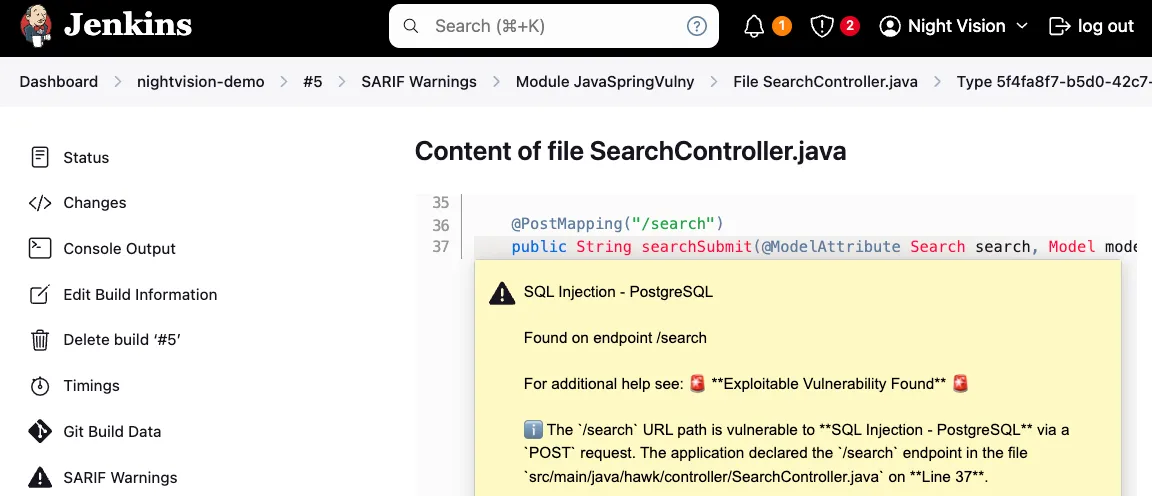
Section titled “Preview”This pipeline will tie any discovered security vulnerabilities back to the code origin using the Jenkins Warnings plugin. Example output is below.
Prerequisites
Section titled “Prerequisites”- To run NightVision scans from Jenkins, you must set the
NIGHTVISION_TOKENenvironment variable. You can create the API key by following the instructions here: Generate API Tokens. - After creating the token, you can store it in the UI for your Pipeline via Manage Jenkins > Manage Credentials.
You must also specify the Target and Authentication credentials (if applicable) for the NightVision CLI.
- As covered in previous pages, you can create those prerequisite resources for this example app by running the following commands from your terminal:
# clone the example codegit clone https://github.com/nvsecurity/java-github-actions-demo.gitcd java-github-actions-demo# Start the example appdocker compose up -d
# Create the nightvision resourcesnightvision target create javaspringvulny-api https://localhost:9000 --type apiecho "Enter the following credentials:"echo "username: user"echo "password: password"nightvision auth playwright javaspringvulny-api create https://localhost:9000
Pipeline
Section titled “Pipeline”- In the example below, observe how the parameters are provided to the job via environment variables. Jenkins Pipeline Repository
pipeline {    agent any
    environment {        NIGHTVISION_TOKEN = credentials('nightvision-token')        NIGHTVISION_TARGET = 'javaspringvulny-api'        NIGHTVISION_AUTH = 'javaspringvulny-api'        TARGET_LANGUAGE = 'java'    }
    stages {        stage('Clone Code') {            steps {                checkout scm            }        }
        stage('Install NightVision') {            steps {                script {                    sh 'wget -c https://downloads.nightvision.net/binaries/latest/nightvision_latest_linux_amd64.tar.gz -O - | tar -xz'                }            }        }
        stage('Extract API Documentation from Code') {            steps {                script {                    sh """                    ./nightvision swagger extract . --target "${env.NIGHTVISION_TARGET}" --lang "${env.TARGET_LANGUAGE}" || true                    if [ ! -e openapi-spec.yml ]; then                        cp backup-openapi-spec.yml openapi-spec.yml                    fi                    """                }            }        }
        stage('Start the App') {            steps {                script {                    sh 'docker compose up -d; sleep 10'                }            }        }
        stage('Scan the API') {            steps {                script {                    sh """                    ./nightvision scan "${env.NIGHTVISION_TARGET}" --auth "${env.NIGHTVISION_AUTH}" > scan-results.txt                    ./nightvision export sarif -s \$(head -n 1 scan-results.txt) --swagger-file openapi-spec.yml > results.sarif                    """
                }            }        }
        stage('Upload SARIF file to Jenkins using Warnings Plugin') {            steps {                script {                    // ensure the file exists and then publish it using the Warnings Next Generation Plugin                    sh 'test -f results.sarif'                    recordIssues tool: sarif(pattern: 'results.sarif')                }            }        }    }
    post {        always {            // cleanup            sh 'docker compose down'        }    }}