

Extra Headers
Description
Section titled “Description”Some applications expect a header or cookie on every request that is not part of an authentication flow: a tenant identifier, a feature-flag override, a tracing ID, a static API key, a CDN bypass header. Extra Headers are static name/value pairs you attach to a target. Every scan of that target sends them with every request, on top of any authentication credentials.
This is different from Header and Cookie Authentication, which is a credential resource that lives in Authentications and represents a logged-in session. Extra Headers are bound to the target itself; they apply regardless of which authentication (if any) the scan uses.
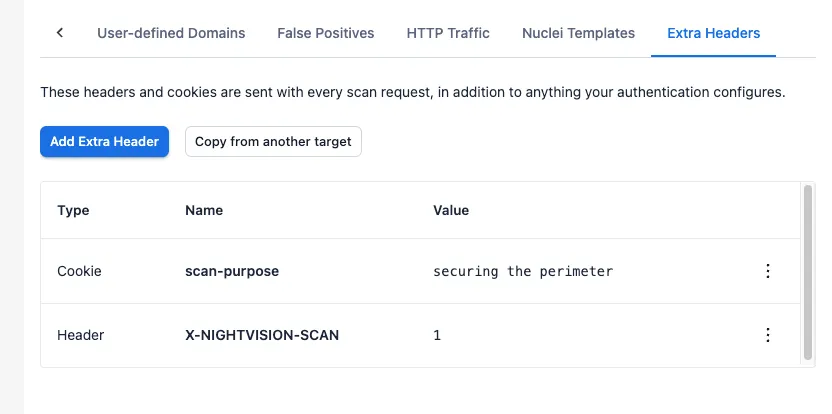
Add Extra Headers
Section titled “Add Extra Headers”Extra Headers can be attached to URL and OpenAPI targets.
- Open the target and switch to the Extra Headers tab.
- Click Add Extra Header.
- Choose Header or Cookie as the Type, then enter a Name and Value.
- Click Add. The new entry appears in the table.
To edit or delete a row, click it or use the row’s actions menu. Long values are truncated in the table; hover the value cell to see the full content.
Copy from another target
Section titled “Copy from another target”If you maintain the same headers across several targets in a project, you can copy them in bulk.
- On the destination target’s Extra Headers tab, click Copy from another target.
- The picker lists every distinct (type, name, value) combination found on the project’s other targets. Rows that already exist verbatim on the destination are hidden. Rows that share a name with an existing entry but carry a different value are shown with a Conflict chip and cannot be selected.
- Select the rows you want and click Copy. The selected rows are added to the destination target as new entries.
How they are applied during a scan
Section titled “How they are applied during a scan”Extra Headers are merged into the scanner’s request configuration alongside any headers and cookies from the authentication credential. They go out with every request the scanner makes, including spider, active scan, and re-request traffic.
Cookies set as Extra Headers carry the target URL’s host as their domain,
so a cookie attached to a target at https://app.example.com/ is sent on
requests against app.example.com and its subpaths.
Because Extra Headers are bound to the target, they apply to ad-hoc scans, scheduled scans, and CI-triggered scans alike; there is no separate configuration on the scan itself.
Limits
Section titled “Limits”| Field | Limit |
|---|---|
| Name | 255 characters |
| Value | 4,096 characters |
If you need to substitute a secret value rather than store it in clear text, contact support@nightviz.ai. Secret substitution for Extra Headers is not currently supported.