

GitHub Actions
In this tutorial, you’ll learn how to:
- Integrate NightVision DAST scans into your CI/CD pipelines to find exploitable vulnerabilities within minutes automatically.
- Use NightVision’s API Extraction to scan the source code to find the attack vector in the file and line of code.
- Create GitHub Security Alerts so developers can view the vulnerabilities directly in GitHub.
Workflow File
Section titled “Workflow File”name: Test Case - Java Spring App
on: push: workflow_dispatch:
env: NIGHTVISION_TOKEN: ${{ secrets.NIGHTVISION_TOKEN }} NIGHTVISION_TARGET: javaspringvulny-api NIGHTVISION_AUTH: javaspringvulny-api
jobs: test: permissions: security-events: write runs-on: ubuntu-latest steps: - name: (1) Clone Code uses: actions/checkout@v3
- name: (2) Install NightVision run: | wget -c https://downloads.nightvision.net/binaries/latest/nightvision_latest_linux_amd64.tar.gz -O - | tar -xz; sudo mv nightvision /usr/local/bin/
- name: (3) Extract API documentation from code run: | nightvision swagger extract . --target ${NIGHTVISION_TARGET} --lang java || true if [ ! -e openapi-spec.yml ]; then cp backup-openapi-spec.yml openapi-spec.yml fi
- name: (4) Start the app run: docker-compose up -d; sleep 10
- name: (5) Scan the API run: | nightvision scan ${NIGHTVISION_TARGET} --auth ${NIGHTVISION_AUTH} > scan-results.txt nightvision export sarif -s "$(head -n 1 scan-results.txt)" --swagger-file openapi-spec.yml
- name: (6) Upload SARIF file to GitHub Security Alerts if vulnerabilities are found uses: github/codeql-action/upload-sarif@v2 if: success() with: sarif_file: results.sarifPreview: Example Results
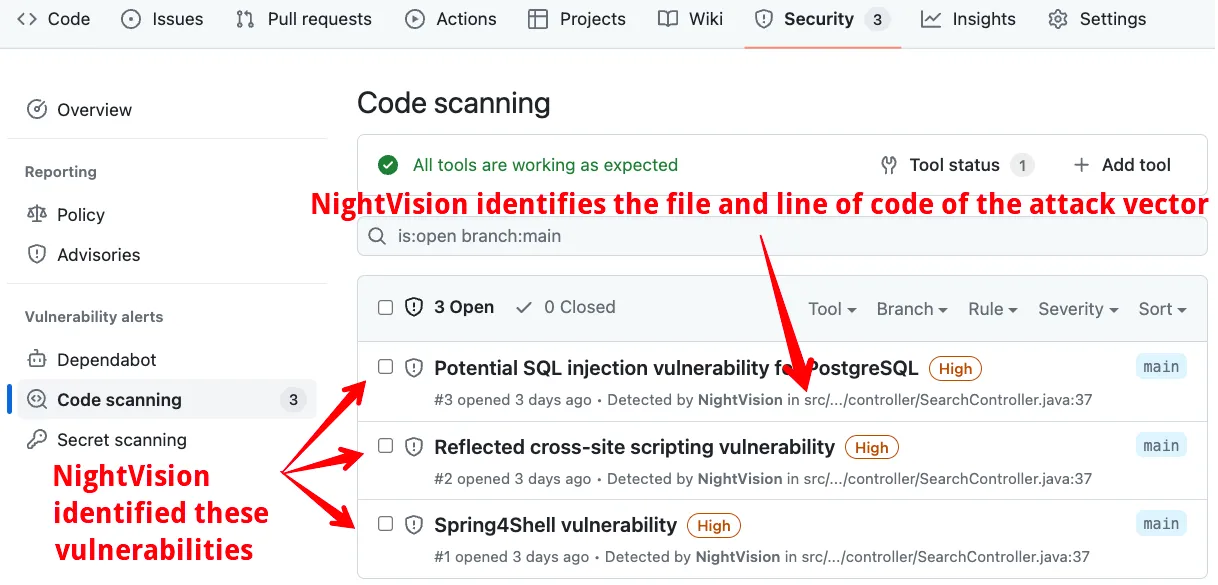
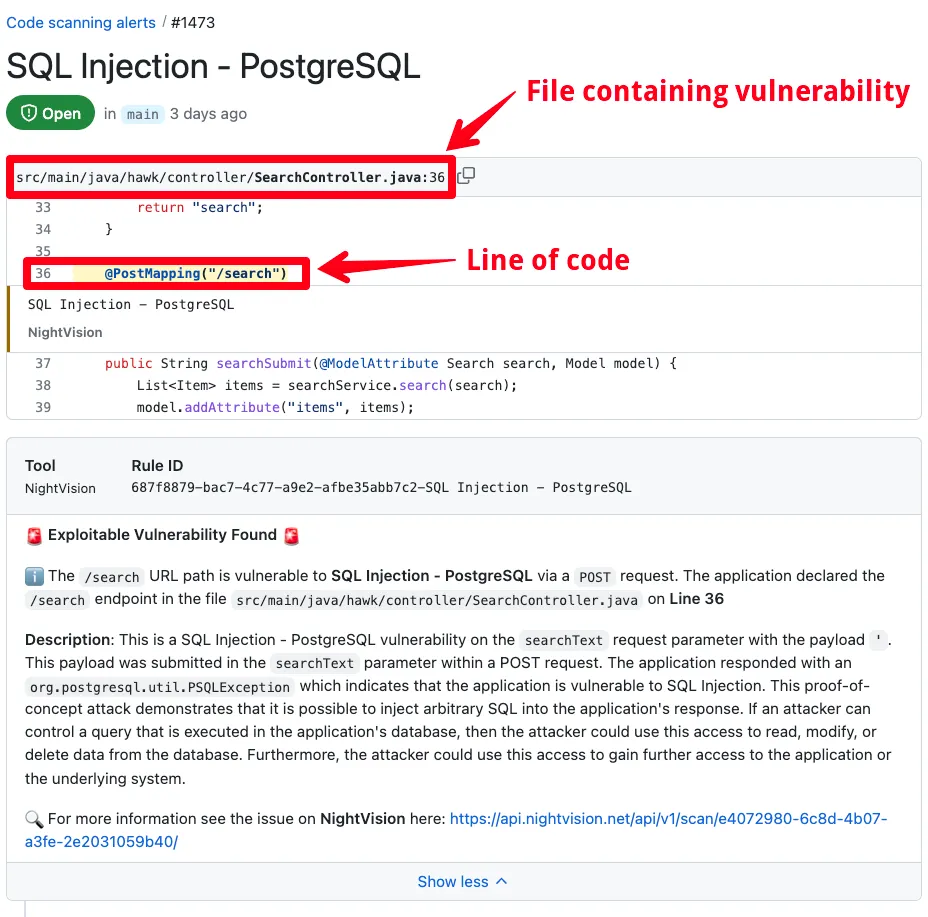
Section titled “Preview: Example Results”Here’s what the results will look like:
Prerequisites
Section titled “Prerequisites”Before we get started, you’ll need to fork the example repository.
Fork the Repository
Section titled “Fork the Repository”- First, sign into GitHub.
- After you are signed into GitHub, fork the example repository: https://github.com/nvsecurity/java-github-actions-demo/fork
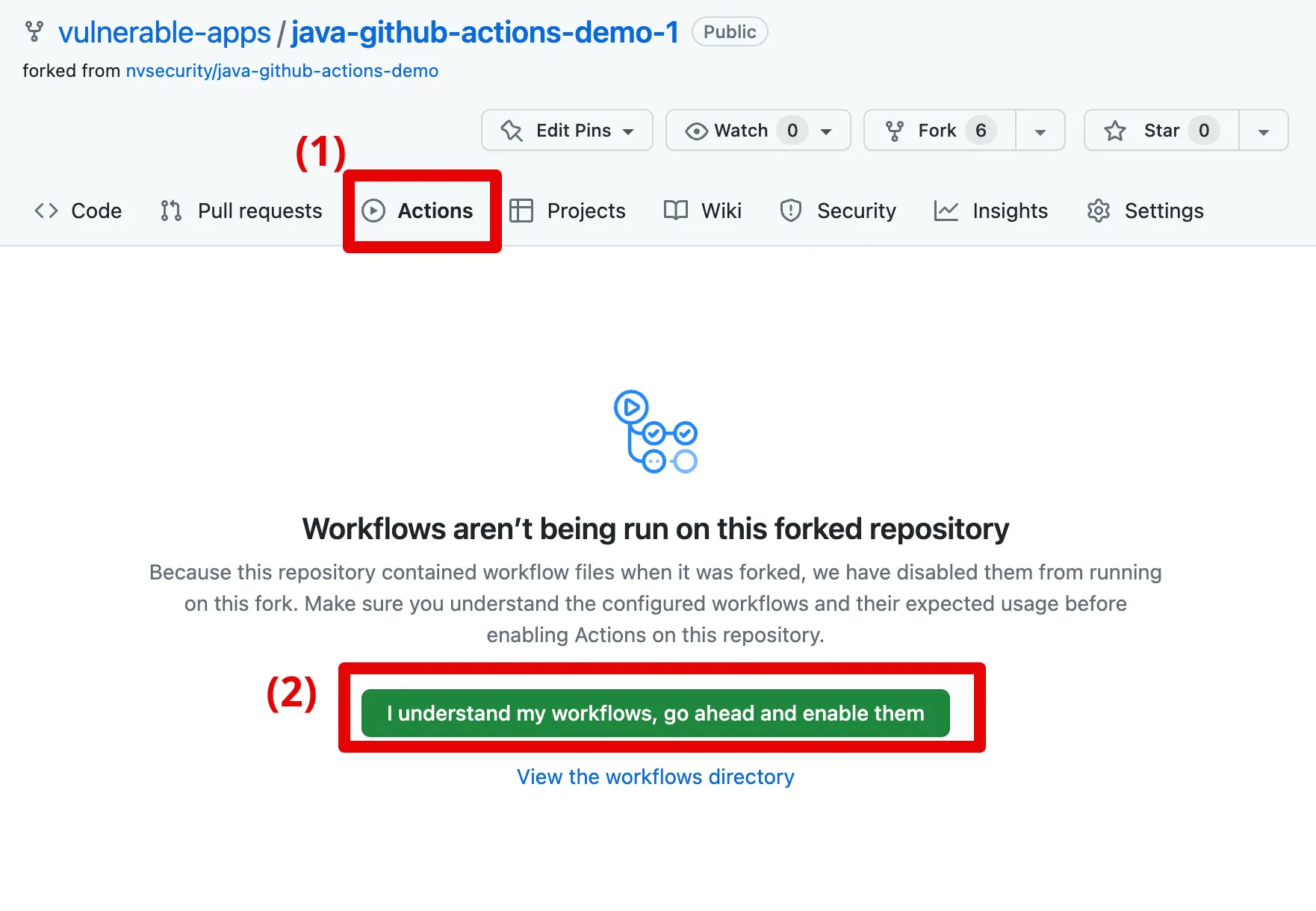

- Click on Actions from the forked repository and enable GitHub workflows for the repository, as shown here.
Once you have created a fork, you can manually navigate to it by following these steps:
- Click on the fork’s profile icon at the top right corner of the GitHub website
- Select Your repositories
- Find the fork in the list of repositories on that page.
Option 1: Easy Mode
Section titled “Option 1: Easy Mode”Open your terminal and run this command:
curl -O https://raw.githubusercontent.com/nvsecurity/nv-public-reference/main/demo-scripts/github-actions-demo.sh && \ chmod +x github-actions-demo.sh && \ ./github-actions-demo.shNow open your GitHub repository in your web browser.
The scan will be complete in about 3 minutes. 🤯
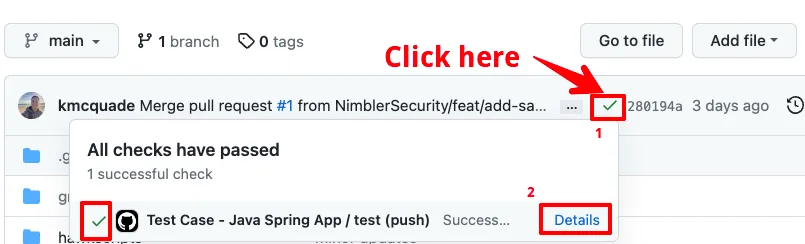
- Optionally, you can click on the GitHub Action execution to watch it run, as indicated here:

- When the scan finishes, click on the Security tab at the top of the page and then on Code Scanning from the left panel.
- You will see three security alerts: (1) SQL Injection, (2) Cross-Site Scripting, and (3) Spring4Shell. Click on one of them.
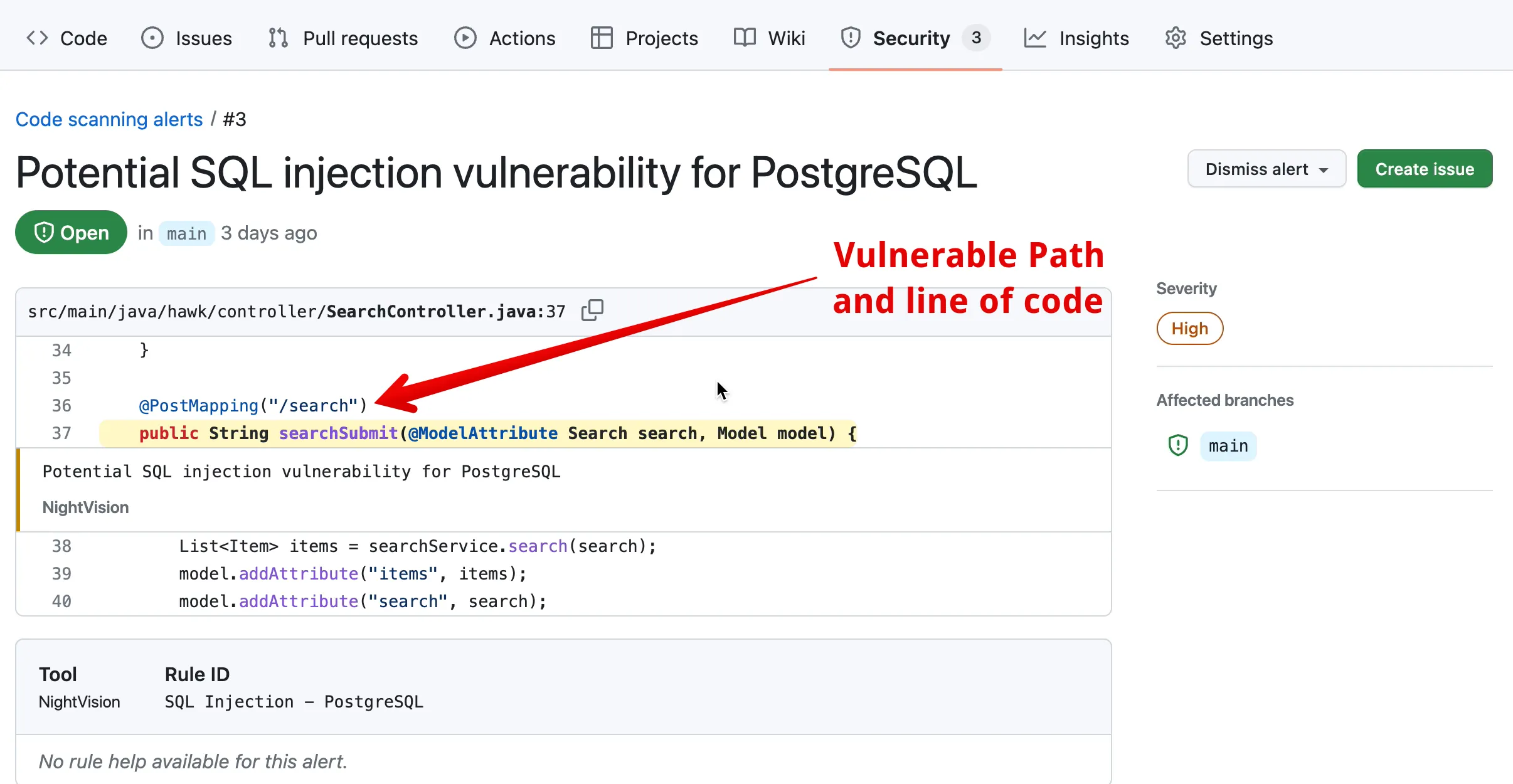
When you select one of the vulnerabilities, you can see the exact line of code where the vulnerable endpoint was defined. In the case below, the URL path /search was vulnerable to SQL Injection on a POST request.
Option 2: Full Tutorial
Section titled “Option 2: Full Tutorial”This tutorial guides you through all the steps manually (rather than via the automated script), so you can understand how it works.
(1) Log into NightVision
Section titled “(1) Log into NightVision”- Next, make sure you have installed the NightVision Command Line. For instructions, see Installing the CLI.
- In your terminal, run the following command. This will launch a browser window and log you into NightVision.
nightvision login(2) Get a NightVision Token
Section titled “(2) Get a NightVision Token”- Next, run this command to get a NightVision token:
nightvision token create- Copy the value of the token.
(3) Create a Secret in GitHub Actions
Section titled “(3) Create a Secret in GitHub Actions”- In GitHub, create a GitHub Actions Repository Secret called
NIGHTVISION_TOKENwith the token value.- To create a new Repository Secret for GitHub Actions, you can follow these steps (also depicted in the GIF below):
- From the repository, click on Settings
- Click on Secrets and Keys in the left panel and then on Actions under it.
- Click on the New repository secret button.
- In the Name field, type
NIGHTVISION_TOKEN - In the Secret field, paste the token value you copied in “Step 2: Get a NightVision Token.”
- To create a new Repository Secret for GitHub Actions, you can follow these steps (also depicted in the GIF below):
(4) Record Authentication
Section titled “(4) Record Authentication”- Next, you will need to spin up the application locally and log into it with test credentials.
- Username:
user - Password:
password
- Username:
# Clone the repository locally from your terminalgit clone https://github.com/$(git config user.name)/java-github-actions-demo.gitcd java-github-actions-demo
# Start the applicationdocker-compose up -d; sleep 10
# Record authentication - click on Form Auth# Username: user# Password: passwordURL="https://localhost:9000"Name="javaspringvulny-api"
nightvision target create $Name $URL --type apinightvision auth playwright create $Name $URL
(5) Push Code Changes
Section titled “(5) Push Code Changes”- Push your code changes to trigger a scan. From the root of the repository, run the following command:
# Add a commit and trigger the CI/CDecho "foobar" >> README.mdgit commit -am 'trigger a github action'git pushNow open your GitHub repository in the browser.
The scan will be complete in about 3 minutes. 🤯
- Optionally, you can click on the GitHub Action execution to watch it run, as indicated here:
- When the scan finishes, click on the Security tab at the top of the page and then on Code Scanning from the left panel.
- You will see three security alerts: (1) SQL Injection, (2) Cross-Site Scripting, and (3) Spring4Shell. Click on one of them.
When you select one of the vulnerabilities, you can see the exact line of code where the vulnerable endpoint was defined. In the case below, the URL path /search was vulnerable to SQL Injection on a POST request.
Takeaways
Section titled “Takeaways”By adding NightVision scans in GitHub Actions, security teams can provide these benefits to development teams:
- Identify exploitable issues automatically: This gives developers a starting point from which to focus their remediation efforts - all within the CI/CD pipeline. NightVision will spin up the application and run the scan within GitHub Actions as soon as an exploitable vulnerability is introduced.
- Make security easier: The developer doesn’t need experience in penetration testing to benefit from automated security scans.
- Surface issues in the developer’s workflow: If a vulnerability is found, it will be reported to developers through GitHub Security Alerts. Every time they visit the repository, they will see it in the “Security” tab at the top of their repository:
