

Uploading OpenAPI Files
Upload when Creating a Target (Portal)
Section titled “Upload when Creating a Target (Portal)”To create an API target in the web portal:
- Navigate to https://app.nightvision.net.
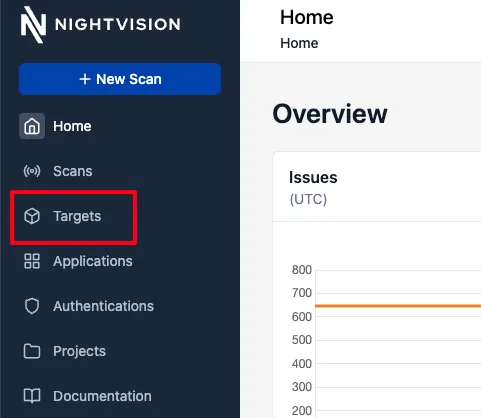
- Click on Targets in the left sidebar.
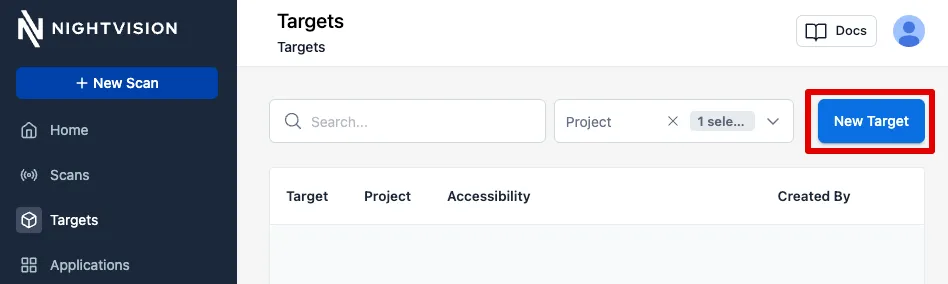
- Click on the New Target button on the right.
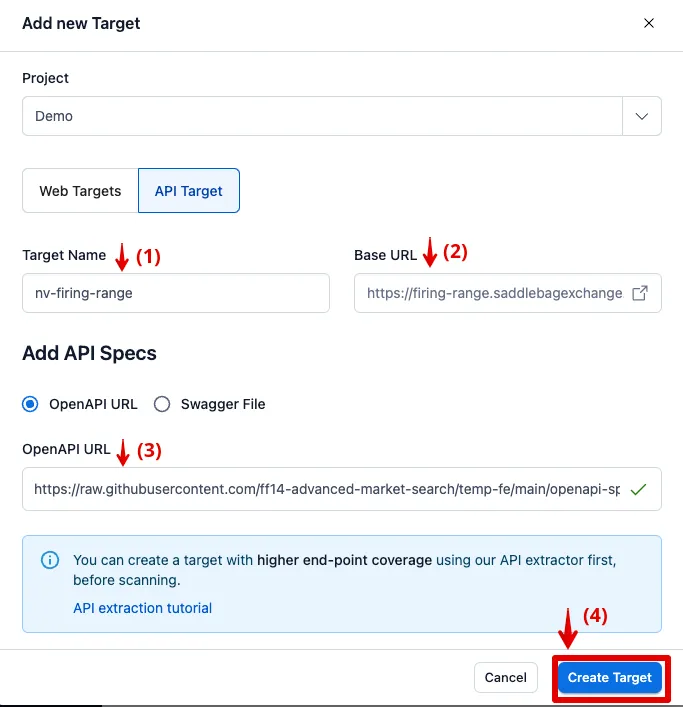
- In the Add New Target form, select “API Target” and enter the following details, then click Create Target:
- Target Name:
nv-firing-range - Base URL: https://javaspringvulny.nvtest.io:9000/
- OpenAPI URL: https://raw.githubusercontent.com/ff14-advanced-market-search/temp-fe/main/openapi-spec.yml
- Target Name:
Uploading OpenAPI files from the CLI
Section titled “Uploading OpenAPI files from the CLI”Create API Targets with a Public OpenAPI file (CLI)
Section titled “Create API Targets with a Public OpenAPI file (CLI)”If the OpenAPI file is available on the public internet, you can create targets via the CLI and specify the URL where the OpenAPI file can be downloaded:
# Option 1: Create the target without an OpenAPI specification (attach it later)nightvision target create nv-firing-range-public https://firing-range.saddlebagexchange.com --type API
# Option 2: Create the target and attach an OpenAPI specificationnightvision target create nv-firing-range-public \  --swagger-url https://raw.githubusercontent.com/ff14-advanced-market-search/temp-fe/main/openapi-spec.yml \  --type API
Create API Targets and Upload an OpenAPI file (CLI)
Section titled “Create API Targets and Upload an OpenAPI file (CLI)”You can create an API Target and specify the OpenAPI file at creation time, instead of attaching the OpenAPI specification later.
# Option 1: Create the target without an OpenAPI specification (attach it later)nightvision target create broken-flask-api http://localhost:4000 --type API
# Option 2: Create the target and attach an OpenAPI specificationnightvision target create broken-flask-api \  --swagger-file openapi-spec.yml  --type API
Upload OpenAPI Files to an Existing Target (CLI)
Section titled “Upload OpenAPI Files to an Existing Target (CLI)”If you have an existing OpenAPI file, you can update the target:
nightvision target update broken-flask-api \ --swagger-file openapi-spec.ymlUse API Discovery for a Target (CLI)
Section titled “Use API Discovery for a Target (CLI)”If you’ve updated your code or want to rely on NightVision’s API Discovery feature, you can update the API Documentation by appending --target to your swagger extract command:
nightvision swagger extract . --target broken-flask-api --lang pythonIf you want to create an OpenAPI file without uploading it to the target, you can append the --no-upload flag:
nightvision swagger extract . --lang python --no-upload