
Creating Targets from Discovery
Discovery tells you what is out there. Creating a target is how a discovered host becomes something NightVision will test. The two are deliberately separate: an inventory contains hosts you may not own, and a target is a decision to scan something, so nothing moves between them without you saying so.
Creating one target
Section titled “Creating one target”In the host table, click Create target in the Actions column and confirm the dialog.
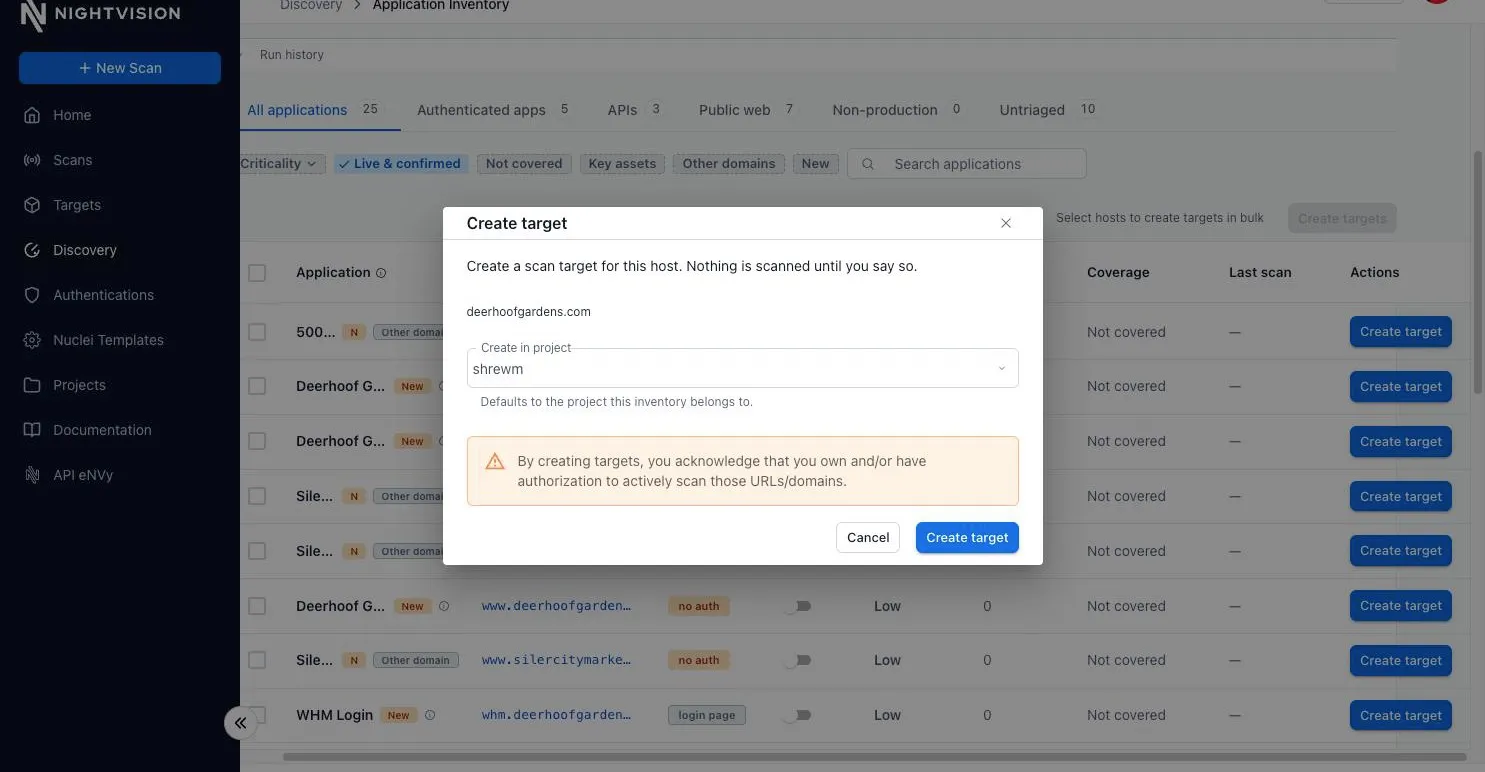
Two columns then say where each host stands:
| Column | Shows | Meaning |
|---|---|---|
| Coverage | Not covered | No target in this project points at this host. |
Never scanned | A target covers it; no scan has run against it yet. | |
Scanned | A target covers it and has been scanned. Last scan says when. | |
| Actions | Create target | Nothing covers this host yet. |
| Start scan | A target exists. Opens the new-scan page with it selected. | |
| View target | Opens the target. |
Creating targets in bulk
Section titled “Creating targets in bulk”Tick the hosts you want and click Create N targets above the table. Hosts that are already covered are dropped from the selection, so the count on the button is the number of targets you will actually get. One request may name up to 200 hosts.
The dialog
Section titled “The dialog”The dialog lists the hosts, notes any that did not respond or that belong to an unconfirmed related domain, and asks two things.
Create in project. Targets default to the project the inventory belongs to. You can send them somewhere else, which is useful when the domain you enumerated is tracked by a different team. A target created in another project is still linked from this inventory’s row, but only targets in the inventory’s own project count as covering a host.
Authorization. Creating a target widens what NightVision will scan, so the dialog asks you to acknowledge that you own or are authorized to actively scan those URLs. This matters most for unconfirmed related domains. See How hosts relate to the domain.
What you get
Section titled “What you get”Each created target is a URL target with:
- Location set to
https://plus the hostname. The probe tries HTTPS first, so this is right for almost every live host, and the location stays editable if a host only serves plaintext or uses a non-standard port. - Name derived from the hostname, with dots replaced by underscores, because target names cannot contain dots.
- Description recording that it came from application discovery, and which domain it was found under.
- Internet accessible set from whether the host answered during the run. A host that did not answer can still be scanned through the Smart Proxy if it lives on a network NightVision cannot reach directly.
Starting scans on what you created
Section titled “Starting scans on what you created”Creating a target does not scan it. Once the targets exist, the dialog reports how many were created and offers Start N scans, one per target just created. The button is disabled, and says why, when your role may not start scans or the plan does not allow them. The dialog then says how many scans started; if it cannot confirm one, it says so rather than guessing, and the Scans page is the place to check before retrying.
You can also start a scan on any covered host later from Start scan in its row. See DAST Scans.
When a host is skipped
Section titled “When a host is skipped”A skipped host is usually the ordinary outcome rather than a failure.
| Reason | Meaning | What to do |
|---|---|---|
| Already a target | A target in the destination project already points at this host. | Nothing. The host is covered. |
| Target already added | This row was converted before. | Nothing. |
| Name already used | The name derived from the hostname is taken by another target in that project. | Create the target yourself with a name you choose. |
| Could not be created | The target was rejected, or no legal name could be derived from the hostname. The detail line says why. | Read the detail; create the target manually if it persists. |
The Coverage column stays accurate as targets change elsewhere in the product: adding a target by hand that points at a discovered host marks that row covered, and deleting one returns the row to Not covered.